Telegram automation suite

Run Telegram at scale
from one panel.

Mass messaging, member scraping, account warmup, group operations and session conversion — twenty-five modules sharing one session manager, one pacing engine and one live log across your entire account pool.

Windows desktop Unlimited sessions Proxy per session Free updates
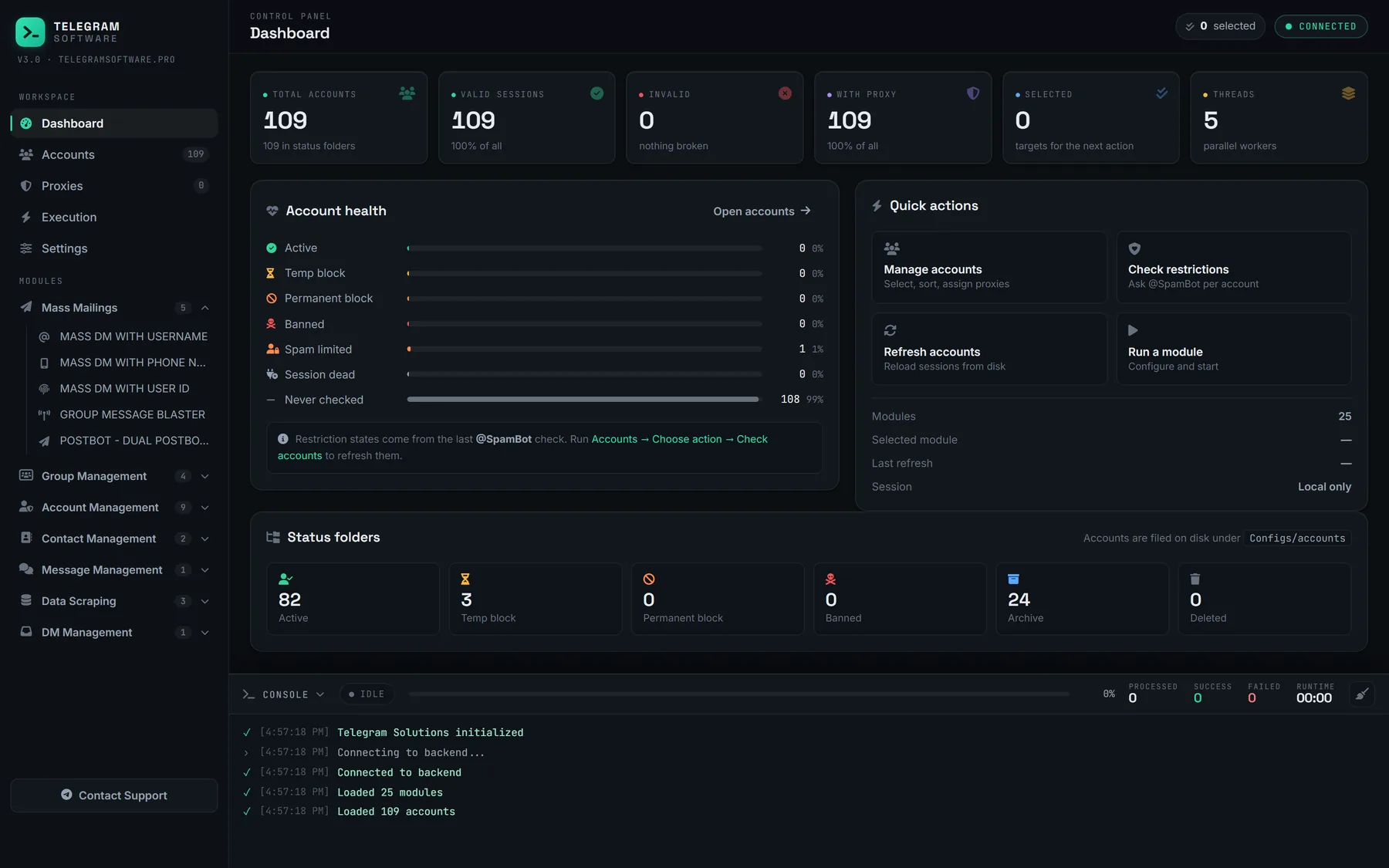
Telegram Solutions control panel: dashboard with account totals, session health breakdown, status folders and a live console.
25Modules included
7Operation categories
UnlimitedSessions per license
24/7Direct Telegram support
Capabilities

Built around the work you actually run

Not a folder of loose scripts. Every module shares the same session pool, the same rate limiting and the same log, so a hundred accounts behave like one predictable system.

Mass messaging that survives limits

Send to usernames, phone numbers or raw user IDs, spread across the whole session pool with per-account caps and randomised delays. Flood-waits are detected and backed off automatically rather than burning the session.

  • Text
  • Forward
  • PostBot
  • Scheduled group posting

Audience data you can work with

Pull members, messages and media out of any group or channel you have access to, then export it in a format you can hand to the rest of your stack.

  • Member scraping → Excel
  • Full content export
  • Phone-number checks

Account health, handled

Staged warmup cycles with human-like timing, behaviour simulation, and bulk validation so you know which sessions are clean before a run starts instead of after it fails.

  • Warmup cycles
  • @SpamBot status
  • Restriction reporting

Group and channel operations

Join, leave, invite and grow at pool scale without opening a single client by hand. Every action is distributed across accounts with its own pacing profile.

  • Bulk join / leave
  • Member add
  • Ownership transfer

One inbox for every account

DM Hub forwards incoming messages from all sessions into a single control group and sends your replies back out from the account that received them.

  • Central control channel
  • Reply routing
  • Bulk DM cleanup

Sessions stay on your machine

Accounts, exports and logs are stored locally. Nothing is uploaded, and the built-in converter moves Session + JSON accounts to TDATA entirely offline.

  • Session → TDATA
  • Per-session proxy
  • Local storage only
Inside the panel

This is the actual application

Not a concept render. Every screen below is the shipping build — account numbers have been replaced with placeholders, nothing else is retouched.

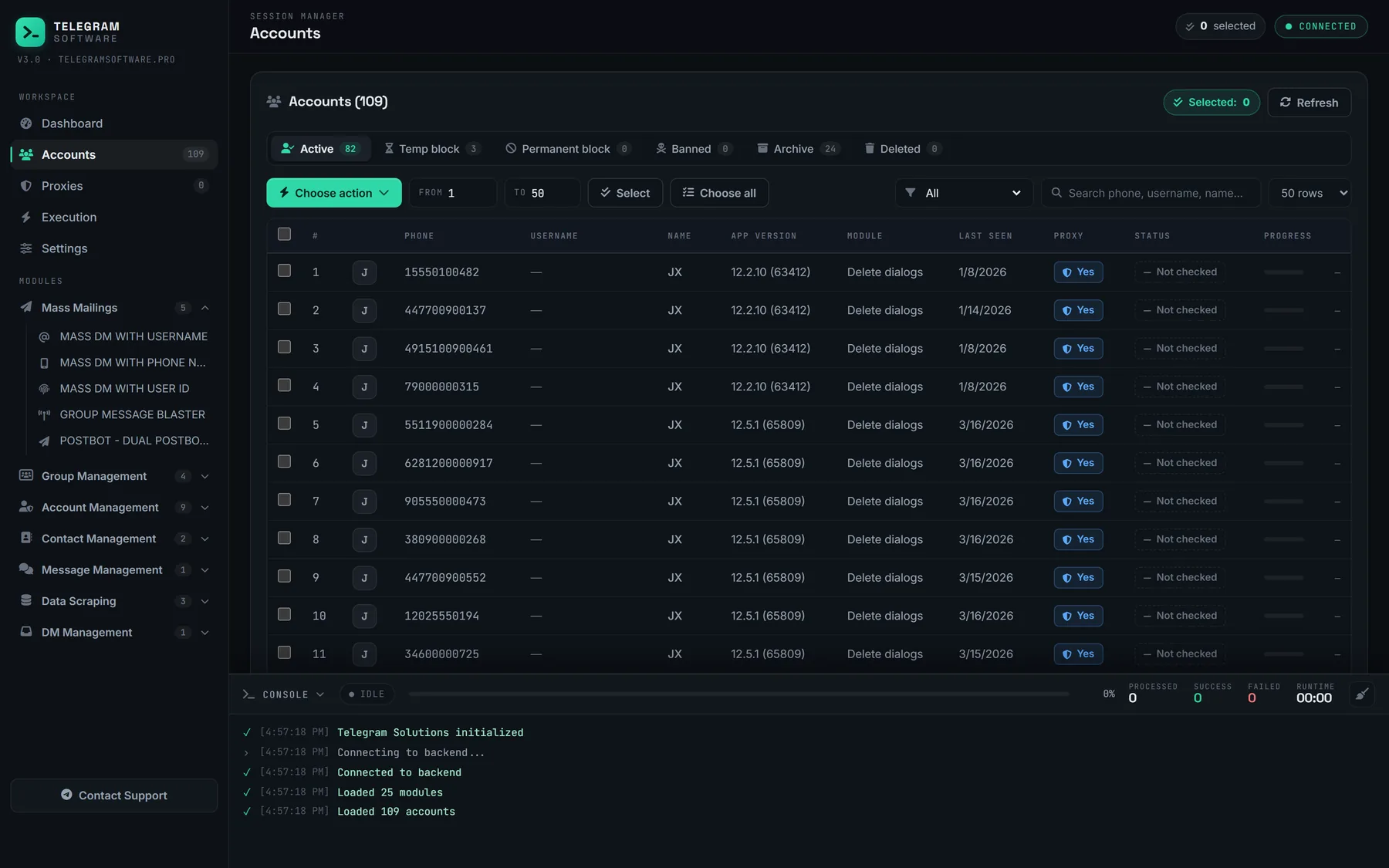
Accounts screen listing sessions with phone, username, app version, assigned module, last seen, proxy state and restriction status, filtered by status folder.
Session manager Every account in one table — proxy assignment, restriction status, app version and last seen. Filter by status folder, select a range, then push the selection straight into a module.
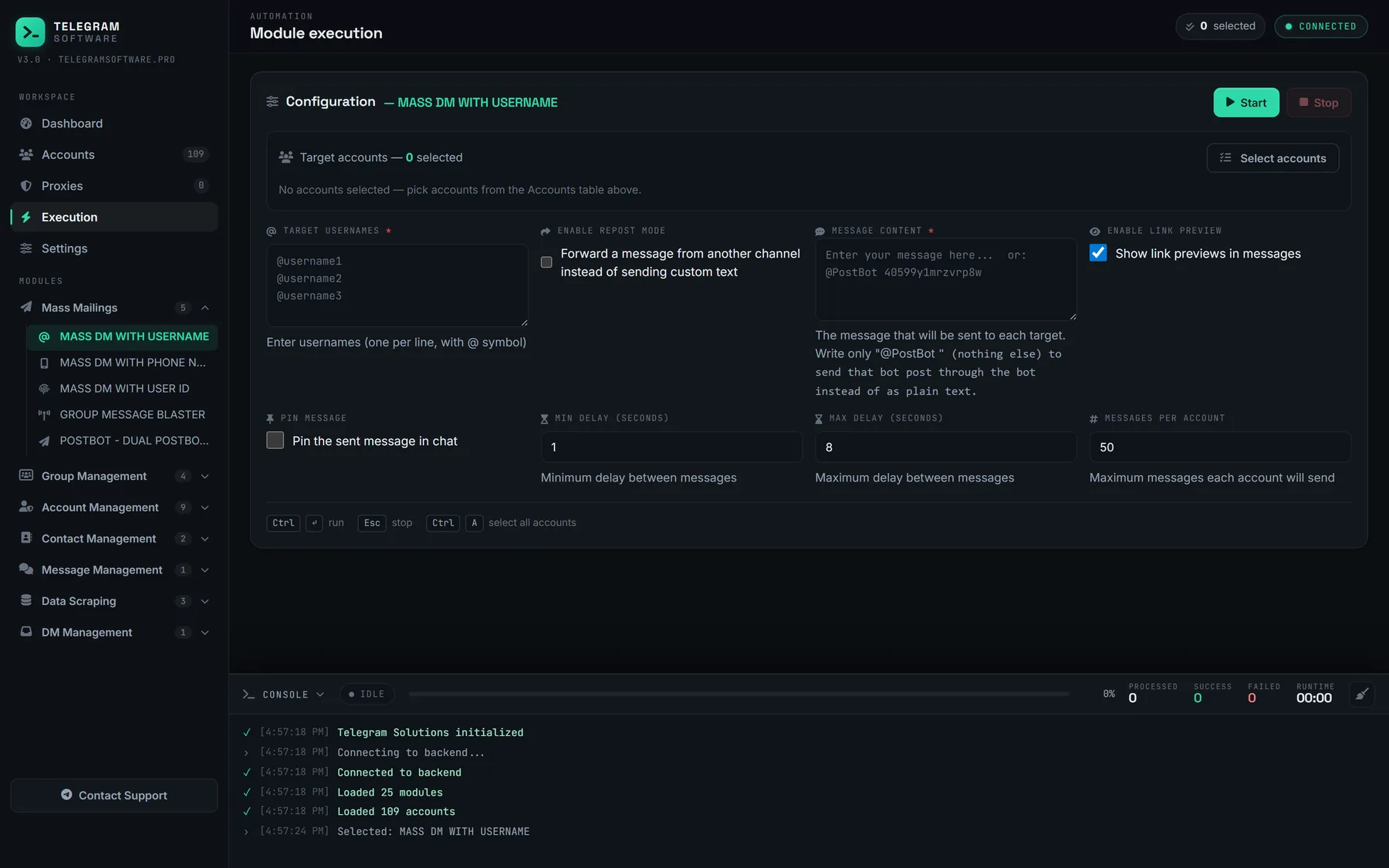
Module execution screen for Mass DM with username, showing target list, message content, repost mode and delay and per-account limit controls.
Pacing you control Minimum and maximum delay, messages per account, link previews, repost mode. The limits are yours to set per run rather than buried in a config file.
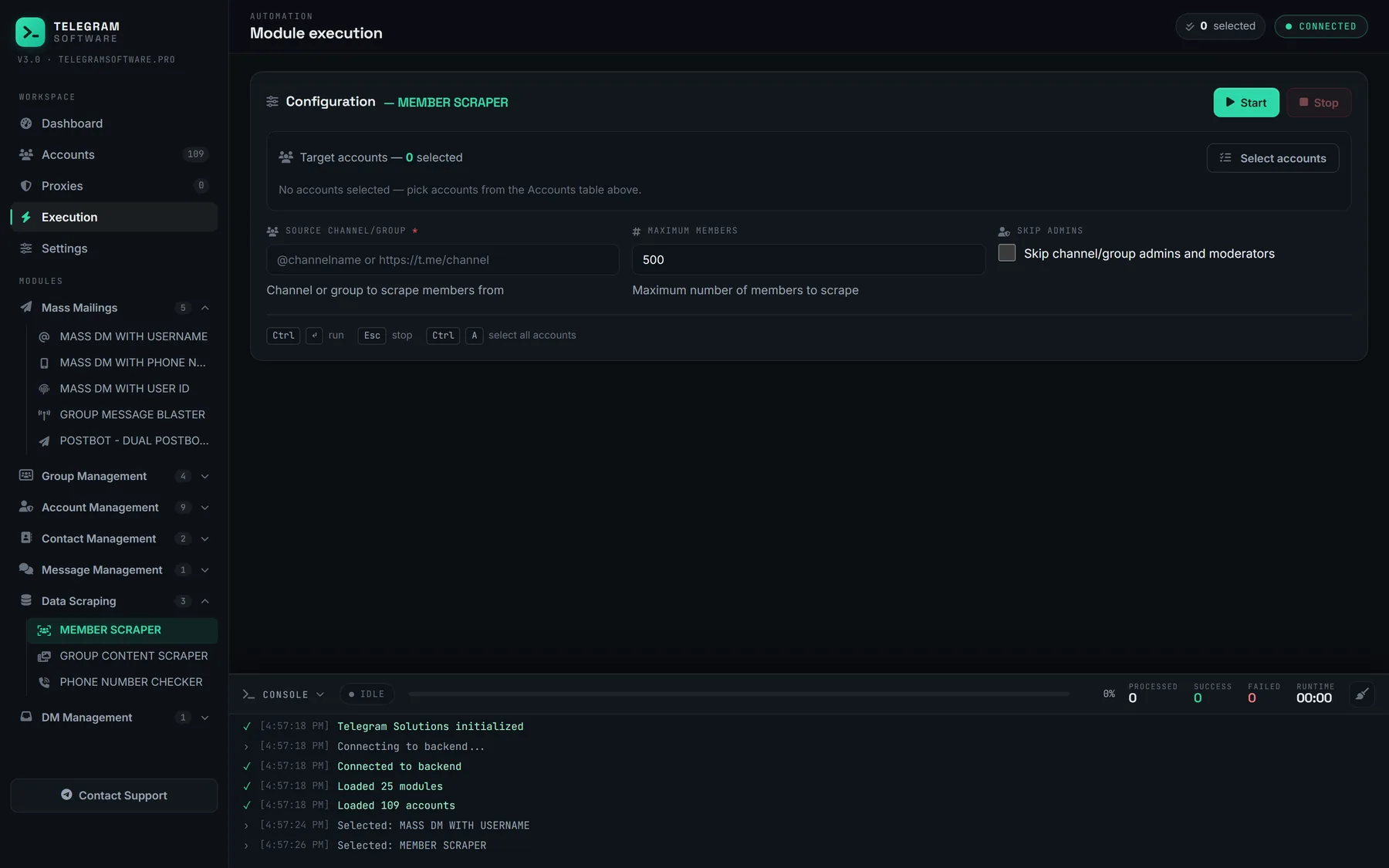
Member Scraper module configured with a source channel field, maximum member count and an option to skip admins.
Every module, one shape Scrapers, warmup, group operations — all of them use the same configure-then-run layout, so a module you have never opened still behaves the way you expect.
Dashboard showing total accounts, valid sessions, proxy coverage, thread count, account health bars and status folder counts.
Pool health at a glance Valid sessions, proxy coverage, restriction breakdown and status folders — so you know what your pool looks like before a run rather than after it fails.
Module catalogue

Twenty-five modules, every one included

No locked tiers and no paid add-ons inside the application. Every license unlocks the full catalogue below.

New modules ship with regular updates and land in your build automatically, at no extra charge on an active license.

Getting started

From install to first run in minutes

Step 01

Install

Receive your license key and the Windows build. Nothing to configure, no server to rent — it runs locally on your machine.

Step 02

Load sessions

Drop in Session + JSON or TDATA accounts, assign proxies, and let the checker report which sessions are clean and ready to work.

Step 03

Run a module

Pick a module, set your list, pacing and limits, then start. Progress, delivery counts and errors stream live for every session.

Pricing

One license. The whole toolset.

Every plan ships all 25 modules, unlimited sessions and free updates. Pick the plan that fits.

Monthly

Full access on a rolling term. Stop whenever you want.

$120/ month

Billed every 30 days

  • All 25 modules, no add-on fees
  • Unlimited sessions and proxies
  • Free updates and new modules
  • Priority support 24/7

Lifetime

Pay once

Everything in Annual, bought outright — plus one module or feature built to your own spec.

$800one-time

Paid once — never expires, never renews

  • Everything in Annual, with no renewal
  • One custom module or feature, built to your brief
  • Scoped with you before work starts
  • Yours to keep and maintained with the app

Full comparison and payment methods on the pricing page.

FAQ

Questions we get every week

Anything not covered here, ask on Telegram.

What do I actually receive after buying?
A license key and a download link for the Windows desktop build. The key unlocks every module for the duration of your plan — permanently, on Lifetime — on your own machine.
Do you provide Telegram accounts or proxies?
No. Telegram Solutions is the software layer. You bring your own sessions (Session + JSON or TDATA) and your own proxies; the panel handles loading, validating and assigning them.
How many accounts can I run at once?
There is no session cap on a license. The real limits are your hardware and your proxy pool. Concurrency, delays and per-account caps are configurable per module.
Which payment methods do you accept?
Cryptocurrency (USDT, BTC and others) is the default. For card or bank transfer, message us on Telegram and we will arrange it.
Are updates included?
Yes. While your license is active you get every update and every new module at no extra cost. Nothing inside the application is sold separately.
What kind of support do I get?
Direct support over Telegram, 24/7, including setup help on your first run. You talk to the people who build the software, not a ticket queue.
Is my data stored on your servers?
No. Sessions, exports and logs stay on your machine. The application does not upload your account files anywhere.

Put the whole toolset to work

Message us for a license key, a walkthrough of any module, or a straight answer about whether the panel fits your workflow.